

The dispatch is a tool used by dispatchers to easily match riders and drivers through a simple and intuitive admin panel and provides real-time visibility and tracking into a fleet by showing ride statuses.
To date, the dispatch is in BETA testing, working with a design partner in South America
My Role
I received full ownership for UX of the dispatch system, and I became the lead designer for all new features.

As a dispatcher, I would like to view all the events from the booking moment until a ride was completed
Edit feature
First, let's get to know the edit feature in the dispatch system. Once a ride was created the dispatcher can edit all the ride's details i.e edit pickup or drop-off location, passenger details, upcoming pickup time, drivers status, driver rejection and etc…
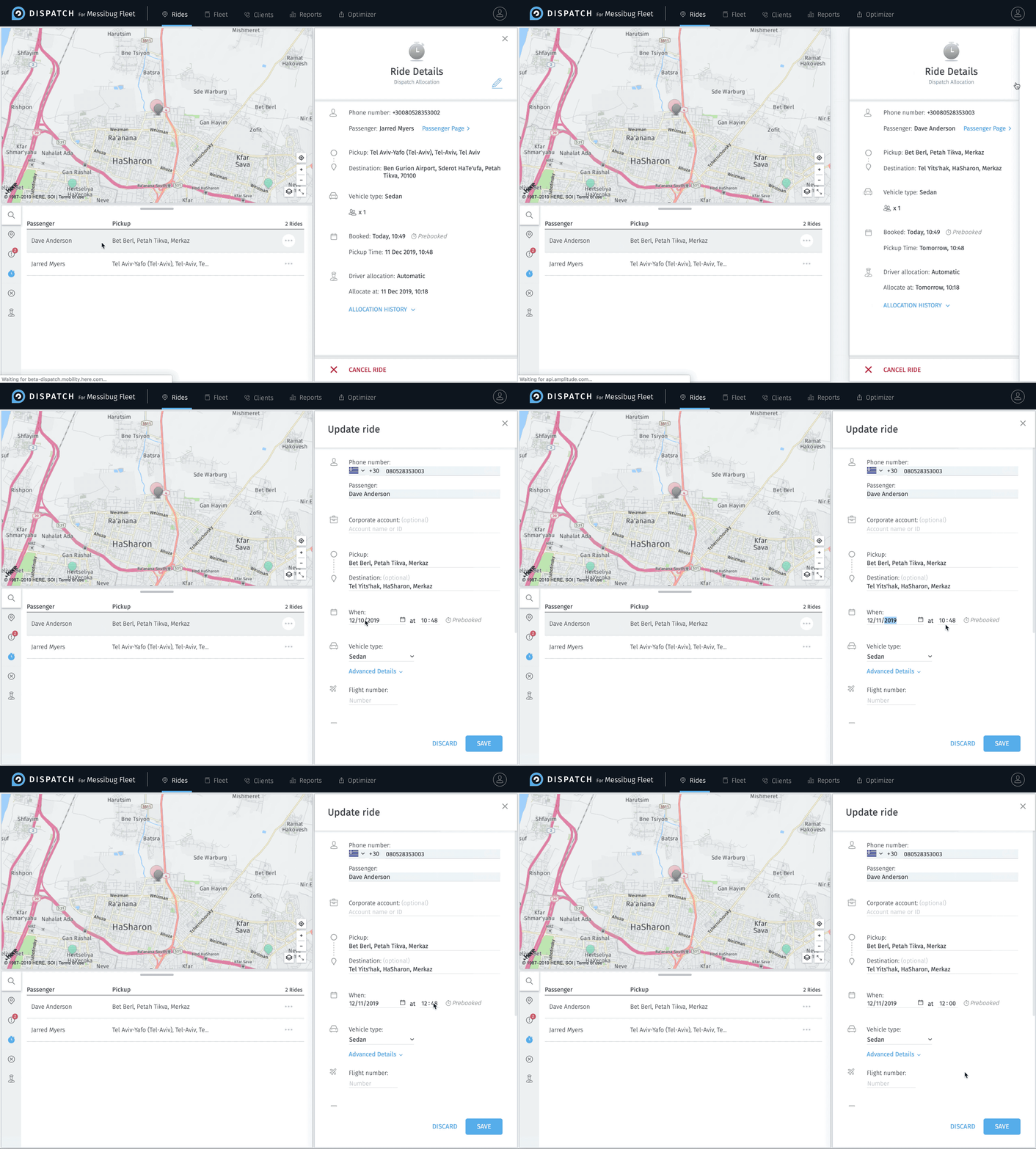
User feedback
We received feedback from a number of clients that they loved the editing feature and use it often. Though, they were missing an indication in the system showing what were the changes that were made.
Understanding the problem
Before throwing out solutions, my manager and I contacted the clients to get a better understanding of the problem and how we can improve the system accordingly.
We ask the following questions:
-
What value do you get from seeing the changes that were made?
-
What changes are important for you to see?
-
Where do you expect to see the updates and changes in the system?
User response
-
Seeing all the changes can help us analyze issues with our workflow, and improve our service. For example, if a rides' pick up location was updated we can contact the driver and confirm he received the update and then prevent mistakes and misunderstanding.
-
Records for the payment system.
-
Improve our customer service.
The idea
Integrating the ability to view all actions via an activity log

What is the activity log?
The activity log helps the dispatcher keep a record of all activities made in the system.
Research
I started my research by analyzing different activity logs and see what I can learn from them. I was mostly inspired by how Google Docs show the changes a user made to the document. let's take a look at some of the points I mapped out:

Proposed solution
Based on my research and learnings, I implemented the design into the ride details screen the "show changes" feature.

Design note*
There are times as a designer we need to make tough choices. I chose to highlight the text with a stone neon yellow color. This did not match the dispatcher's style guide. But it really popped out very clearly to the user. This was more important than the aesthetic matter.
User feedback
We presented our solution to our users and received feedback that the changes are clear but they were more interested in seeing not only “what” changes were made but also “when” the changes were made.
Phase 2
We then went back to the drawing board and came up with the following idea, "let's tell the user a story!"
Showing the user a timeline log of actions made. This solution helped the user understand and analyze in a quick and easy way of all the changes that were made to the ride.
The inspiration for this was similar to how google drive presents changes. Though we made it a bit more detailed, by adding titles, icons and time to all changes.


